Hi friends, I've been wanting to do this for a while, and finally found the time. This is about how I use AI for building Etko. But first of all, what is Etko?
What is Etko?
My friend and I realized we'd missed an important Anadolu Efes game that week—we both found out from other people's stories. Then we talked about how annoying it is to discover events. You have to check one website for basketball games, another for Zorlu PSM concerts or plays, another for club events. Everything is super distributed, and the UX on these ticketing websites is terrible. We thought: why isn't there a single app that just aggregates everything?
So we built Etko. We scrape events from all the major ticketing platforms (Passo, Biletix, Bubilet) and put them in one place with a decent interface.

How I (use) AI?
Once we had the basic aggregation working, we realized event data from ticketing platforms was poor. For example, I wanted to follow Jakuzi to learn about their upcoming gigs in advance. The event data had the info in the name or description, but there was no structured way to extract it. So I used ChatGPT API to extract artists from event name & description, created an artist database, and built the Follow Artist flow. This way, users can follow their favorite artists or teams and get notified when new events are added.
This was the first flow for enriching the data. I won't explain each story in detail, but here's the complete list of AI applications we use at Etko:
-
For Enriching Metadata:
- Event Categories — Trained a Turkish BERT model on 1000+ manually labeled events. Achieves 92% accuracy and handles any new source automatically.
- Artist extraction — ChatGPT API parses performer names from event text, enabling "follow artist" notifications across all platforms.
-
For Engagement/Retention:
- Personalized push notifications - Smart timing and content based on user preferences
-
For Acquisition (SEO):
- SEO content generation - Descriptions for events, venues, and artists
-
For Design:
- Prototyping with V0.dev
- Production design with Claude Code
- Generate City banner images with Gemini Nano Banana
-
For Development:
- Coding with Claude Code
- Structured task management
-
For Research:
- Understanding technical docs and implementation patterns
- Technical SEO best practice research with Claude Code
How I Trust AI?
But, AI is probabilistic, not deterministic. It can make mistakes, hallucinate, or produce inconsistent results. You can't just plug it in and trust the output blindly.
So how do we use AI in production without breaking things? I got some help from research:
- I read Marily Nika's book "Building AI-Powered Products"
- I took the DeepLearning.AI Agentic AI course
- I read Lenny's Newsletter: "Why your AI product needs a different development lifecycle"
- I watched Lenny's Podcast: "Why AI evals are the hottest new skill for product builders" with Hamel Husain & Shreya Shankar
Based on these resources, here are the approaches I use to lower risk and ensure reliability:
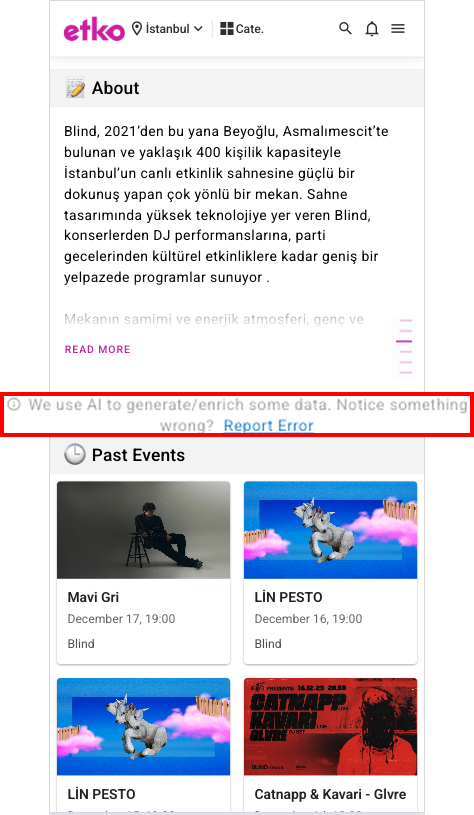
1. Explainable AI (XAI): Make it clear to users that content is AI-generated and give them a way to report problems. For example, in event descriptions, we show "This field was generated by AI" with a "Report Error" button. This transparency builds trust and helps us catch issues users notice.
Here's an example from our Blind venue page. You can see these report error flows on all event pages and venue pages on Etko.
2. Evaluators (Evals): Automated validation checks that catch obvious errors before they reach users. We validate things like output format, length constraints, language rules, and punctuation.
3. Reflection: When an eval fails, we don't just reject the output - we ask the AI to fix the specific problem. For example, if text is too long, we prompt: "The text you generated is 43 characters but needs to be 50-60 characters. Slightly change the text to meet this constraint." Then we validate again. See the Slack reports below—reflection typically improves our success rate from 30-50% to 96-99%.
4. Human-in-the-loop: Manual review before critical content goes live. We build safety windows (like 24 hours for push notifications) where we can review and stop the process if needed.
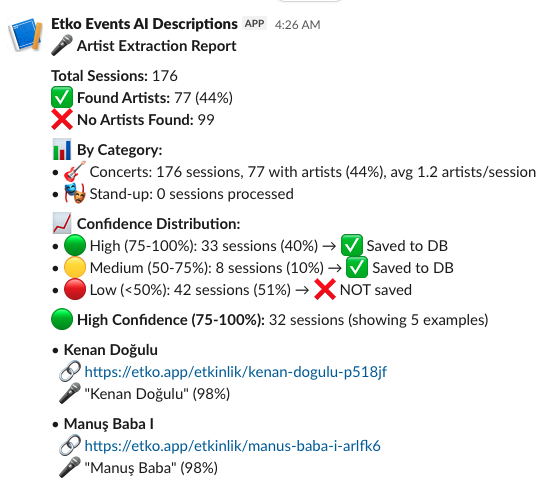
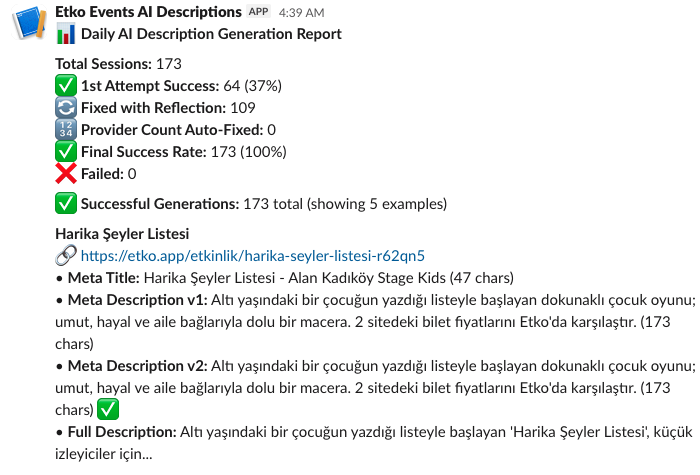
What these reports show:
- Left: Artist extraction results with confidence scores. Low-confidence extractions are flagged for review before saving to the database.
- Right: AI description generation showing eval + reflection in action. Initial success was only 37%, but after the reflection loop fixed constraint violations, it reached 100%.
✓ Why this works: These reports arrive in Slack daily, giving me visibility into every AI batch job. If something looks wrong—unusual error rates, strange outputs—I can pause the flow before content reaches users. This is human-in-the-loop at scale: automated monitoring with human judgment as the final gate.
Example: Weekend Push Notification Flow
Here's how these approaches work together, in an agentic workflow, when generating push notifications to promote popular weekend events:
- Get data: For each user, use SQL to fetch popular events in their city for the weekend
- Select event: AI chooses one of the most popular events, that is worth promoting for the weekend
- Generate content: AI creates the notification title and body text
-
Validate with evals: Our validator class checks
three things:
- Length: Title must be 40-50 chars and main messages 80-100 (push notification best practices)
- Turkish grammar: Using a Turkish NLP Library to check for compliance to Turkish language specific suffix rules
- Punctuation: Must end with a period or exclamation mark
- Reflection if needed: If validation fails, create a specific prompt about the problem (e.g., "Your text is 38 characters but needs to be 40-50 characters") and have AI regenerate. Validate again.
- Track results: Repeat this process for all users and calculate overall success rate
-
Human review: Send summary to Slack channel with:
- Overall success/error rates
- Sample successful notifications
- Sample failed notifications (with clickable URLs to review)
- 24-hour window before actually sending to users
- Ability to stop the whole batch if something looks wrong

This flow combines evals, reflection, and human-in-the-loop to make AI reliable enough for production. None of these are perfect alone, but together they catch most issues before users see them.
Business Impact
When we first launched this AI generation flow for push notifications, we didn't have any evals in place. We weren't even measuring success rates - we just trusted the AI output and sent it to users.
Once I started implementing eval scores and actually measuring compliance, I discovered the reality: only about 50% of generated push notifications were complying with best practices for text length. Half of our notifications were either too short or too long for optimal engagement.
By implementing the evals, reflection, and human-in-the-loop process I described above, I improved that compliance rate from 50% to 98%. And surprisingly, this didn't increase costs - it actually reduced them by 75% because we were no longer wasting API calls on bad outputs that would need to be regenerated manually.
Today, 20K active users receive personalized notifications with less than 1% error rate. This guardrails system allows us to run AI-generated content at scale with confidence, knowing that quality is built into every step of the process.
Conclusion
AI is not magic - it's a tool that needs guardrails. At Etko, we use it for everything from data enrichment to push notifications to development, but only because we've built systems to catch errors before users see them.
The key lessons: be transparent with users about AI-generated content, validate everything with evals, use reflection to fix errors, and always have human review before anything critical goes live. None of these approaches are perfect alone, but together they make AI reliable enough for production.
If you're building AI products, don't just plug in an API and hope for the best. Think about where it can fail, build validation layers, and be honest with your users about what's AI-generated. That's how you ship AI features that actually work.